 YouTube
 Facebook
 X
X LinkedIn
 Pinterest
 Instagram

 Chris Eberle
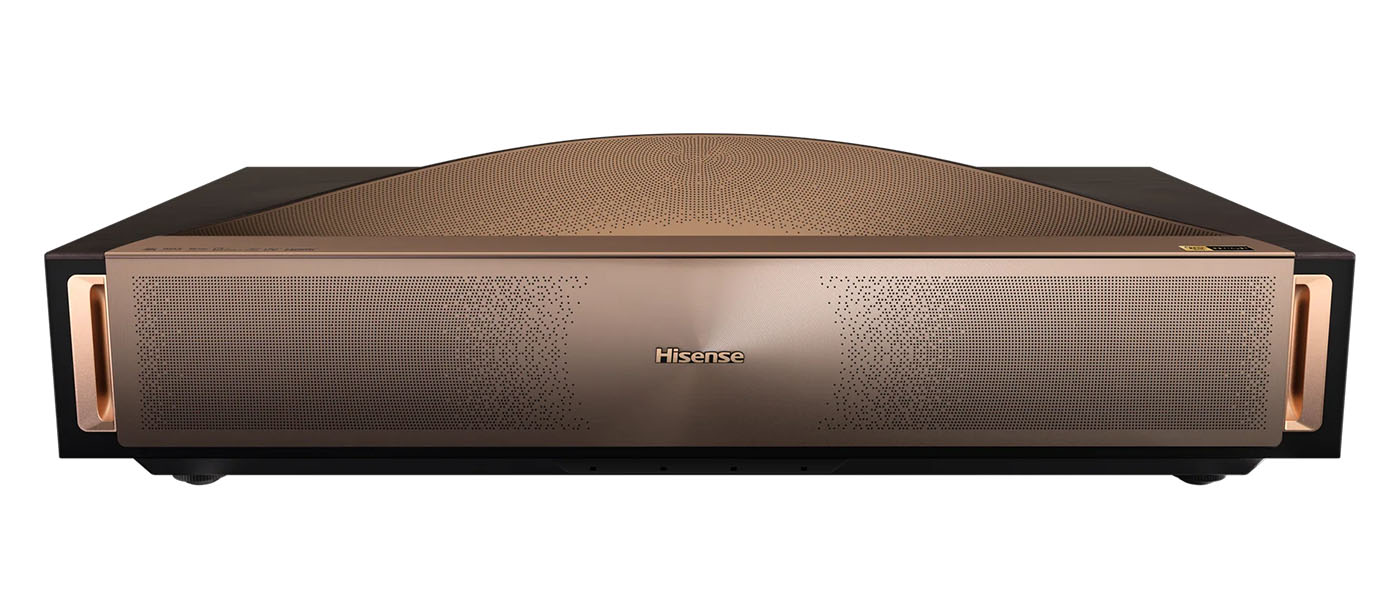
The Hisense L9Q is a premium ultra-short-throw projector with 4K resolution, a huge color gamut, and premium audio courtesy of Devialet and Opéra national de Paris. A tri-laser DLP light engine delivers 3840 x 2160 pixels, Dolby Vision, HDR10+, HDR10, HLG, and a huge color gamut. 10 internal speakers create an impressive sound experience, and it has a high-end look that will complement any décor.
Hisense L9Q Tri-Laser UST Projector
- Ultra-short-throw (UST) DLP 4K projector
- Tri-laser light engine delivers a huge color gamut
- Rated for 5,000 ANSI lumens
- AI options for color, mode, and image optimization
- Built in Google TV
- 10 internal speakers tuned by Devialet and Opéra de Paris
- Dolby Vision, HDR10+, HDR10 and HLG
- Dolby Atmos, DTS:X
- Google Assistant, Amazon Alexa, Chromecast, AirPlay 2
- Four HDMI inputs
- Internal tuner for over-the-air content
What do Hisense, Devialet, and the Opéra national de Paris have in common? The cheeky answer is that those brand logos all appear on the Hisense L9Q UST Projector. But in practice, Devialet and Opéra national de Paris have provided support for some of the best audio I’ve ever heard from a projector. With 10 internal speakers and 116 watts of amplifier power, the L9Q creates a sound superior to any sound bar. And it looks great doing it with high-end styling that you’ll want to show off rather than hide in some overpriced AV furniture.
The L9Q delivers in the video department too, with a DLP chip and a tri-laser light engine good for 5,000 ANSI lumens and a tremendous color gamut. 4K resolution comes from XPR shift technology, which puts 3840 x 2160 addressable pixels on the screen, which can be from 80 to 200 inches diagonal. It also includes Google TV and support for Google Assistant and Amazon Alexa. You can play audio through it using Chromecast or Apple AirPlay 2.
The L9Q is an all-in-one AV solution wrapped in a receiver-sized component for $6,000 at this writing. I’ve been impressed with Hisense’s performance in the past, and I expect this projector will also elicit a few wows during testing. Let’s take a look.
Type:
0.47” DLP with RGB tri-laser array
Resolution:
3840 x 2160 @ 60 Hz
HDR:
Dolby Vision, HDR10+, HDR10, HLG
3D:
frame pack, side/side, top/bottom
Service life:
25,000 hours
Light output (mfr):
5,000 ANSI Lumens
Throw ratio:
0.18
Screen size:
80” to 200”
Video connections:
2x HDMI 2.1, 2x HDMI 2.0 w/eARC
Audio connections:
1x optical
Audio codecs:
Up to Dolby Atmos and DTS:X
Streaming/mirroring:
Chromecast, AirPlay 2
Control:
Google Assistant, Amazon Alexa
Additional connections:
2x USB-A, 1x USB-C, Wi-Fi, RF antenna, RJ-45, Bluetooth
Dimensions (W x H x D):
24.6″ x 6.5” x 12.5”
Weight:
28.4 lbs.
Warranty:
2 years
Price:
$5,999.99
Company:
SECRETS Tags:
Hisense, L9Q, tri-laser projector, triple laser projector, DLP projector, ust projector, ultra short throw projector, ultra hd projector, 4k projector, devialet, dolby atmos, dolby vision
Secrets Sponsor
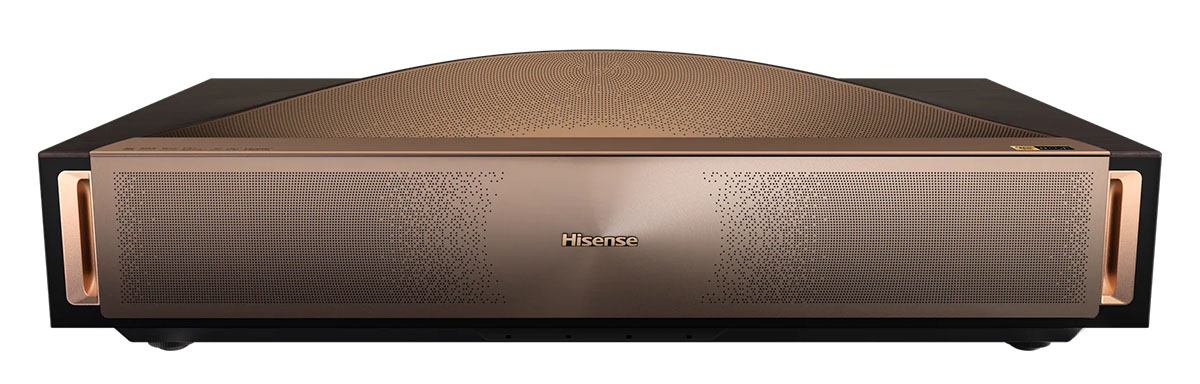
There is a lot to see here; the L9Q includes everything needed for a one-box media solution. You get a high-end display, high-end audio, and every connection option imaginable for external sources, wired and wireless.
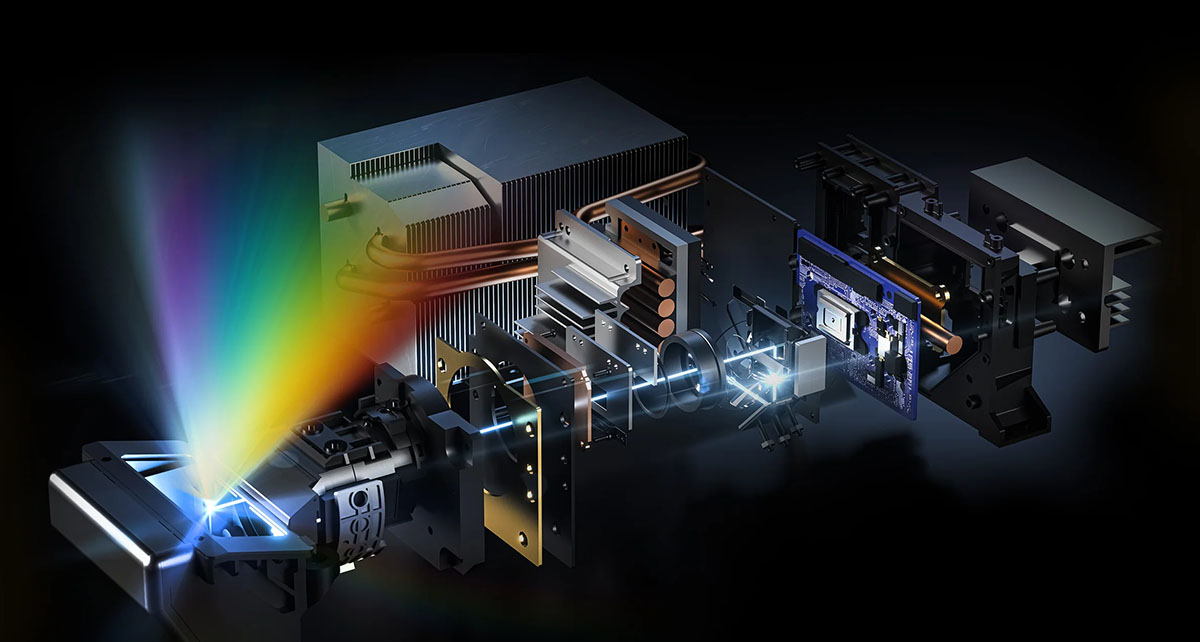
The light engine is a single 0.47” DMD DLP chip with an optical pixel shift device that creates true Ultra HD 3840 x 2160 resolution. There is no option to turn this off, but you can run gaming consoles at 2K/120 Hz with low latency using a switch in the OSD. The light comes from a tri-laser array, one for each color, RGB, and delivers a total peak output of 5,000 ANSI lumens with a service life rating of 25,000 hours. There are a myriad of dynamic contrast options, some with the AI label, along with dynamic tone mapping for HDR10 and HLG. The L9Q also supports Dolby Vision and HDR10+. The triple laser technology means a huge color gamut. BT.2020 coverage is 110% which means this projector is very colorful. It defaults to BT.709 for SDR as it should, but you can opt for P3 or 2020 in any content format.
The audio is equally impressive with hardware from Devialet. That’s the French company that likes to display very large volume knobs on top of elegantly styled audiophile components. There are 10 speakers inside the cabinet in a 6.2.2 configuration with 116 watts of amplification in total. I’ll talk more in depth about the sound quality later, but spoiler alert, it’s phenomenal. Tuning comes from the Opéra national de Paris, yes, THAT Paris Opera House. Hisense bills the sound as “opera quality.” I’m not sure what that means exactly, but in practice, it works incredibly well. Codec support goes up to Dolby Atmos and DTS:X.
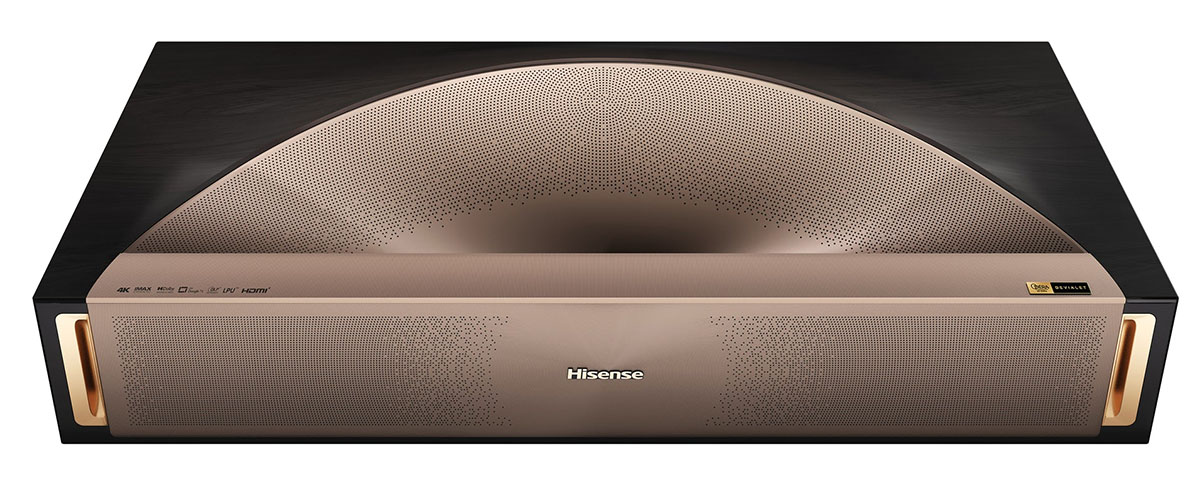
The lens has a throw ratio of just 0.18, which means you can put the L9Q very close to the screen. It’s designed to project an image size between 80 and 200 inches, depending on distance. There are four independently adjustable feet to get it leveled. And there is motorized focus and digital keystone correction, which can be applied manually.
On the outside, the L9Q presents itself with premium elegance. The gold parts of the top and front are metal and perforated for speaker output. More speaker vents appear on the sides. The lens sits inside a small well with sensors that will blank the image if you get too close. This prevents the user from being accidentally blinded. Brightness is prodigious; I measured well over 350 nits off the screen in the calibrated picture modes, and it can top 500 nits on a 1.3 gain screen at its maximum.
In the back are four HDMI inputs, two 2.1 and two 2.0. HDMI 3 includes e/ARC. You also get an optical audio output along with USB A & C. An RJ-45 jack accepts an Ethernet cable, and there’s Wi-Fi and Bluetooth. You can stream and mirror using Apple AirPlay 2 or Chromecast.
The L9Q is truly a television, not only because it includes Google TV but also because it has an internal tuner with an RF antenna connection. You can scan over-the-air channels in the OSD. The streaming interface is the familiar Google TV setup that integrates the projector’s menu system, which has every conceivable option for video, audio, and convenience.
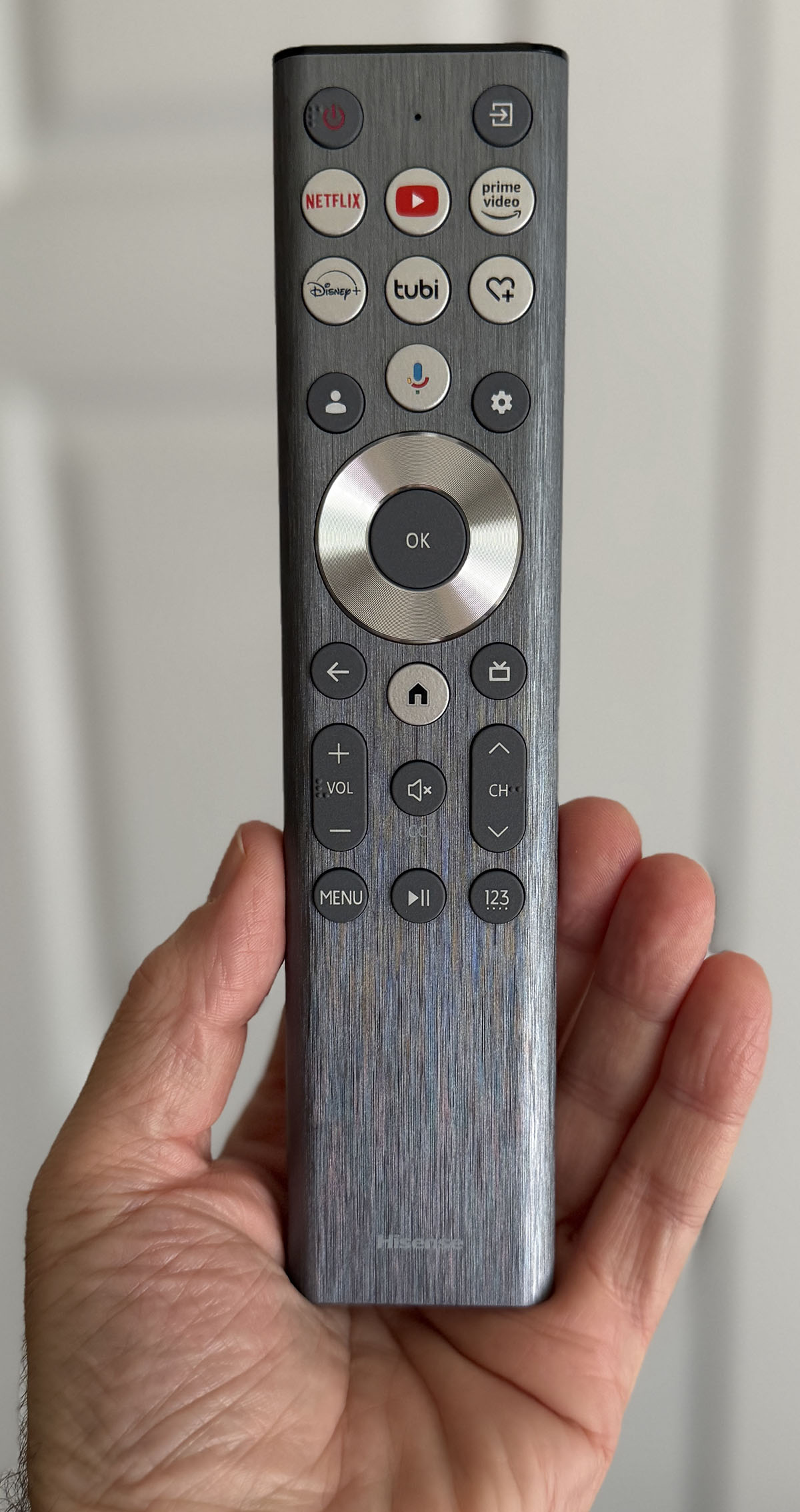
The remote is a slick wand with a brushed finish and a motion-sensitive backlight. It has one-press keys for Netflix, YouTube, Prime Video, Disney+, and Tubi. There’s an input selector up top, a navigation pad in the middle, and additional buttons for volume, channel, home (which takes you to Google TV), and transport, which works with HDMI CEC-enabled source components.
For initial setup, I connected the L9Q to a pattern generator and ran it for a few hours to make sure the color would be stable for testing. The first time you power it on, it asks for a Google login, which I provided, then updates for around 10 minutes. It also presented me with keystone options and a screen for focus adjustment. The L9Q sits closer to the screen than its predecessor, the L9H. This makes placement more critical as even the slightest shift in the projector will cause the image to go out of square. It took me a while to level the feet and get it just right so that the entire screen was in focus. Once done, though, the image was very sharp.
The menu system is Google TV standard and incorporates all the L9Q’s image settings along with audio options, networking, power management, and inputs. There are six picture modes for SDR, the same six for HDR10, and three more for Dolby Vision. All modes can be calibrated with two or 20-point white balance, a 20-point gamma editor, and full color management. The L9Q is reasonably accurate out of the box, but calibration takes it to reference level.
The laser engine has 10 output levels, and at its brightest, it puts around 350 nits on a 1.3 gain screen. A Brightness Enhancer ups that to over 530 nits on its ultra setting, but also impacts the color temperature. Bottom line: if you want to use the Brightness Enhancer, set it before calibration.
To get color in line, I only needed to use the two-point white balance for both SDR and HDR10 to get perfect color and gamma. The L9Q also has selectable color gamuts. It correctly defaults to BT.709 for SDR content, but you can choose P3 or BT.2020 if you want. These gamuts are automatically called up in HDR mode depending on the content encoding. I noted that when Brightness Enhancer was turned on, only the 20-point white balance sliders were available. The 2-point option was grayed out.
There are also many audio settings that change the sound stage, a bit like the processor modes in an AVR. You can opt for the optical or analog outputs if you’d rather use an external system. If you have a full-range surround system, I can see this being the right choice. But if you are thinking a sound bar will be an improvement, think again. The L9Q has better audio than any sound bar I’ve reviewed, including the high-end models. I’ll talk more about that later.
With Google TV set up and the calibration completed, I connected a Panasonic DP-UB9000 Ultra HD Blu-ray player and an Apple TV. I also installed the projector’s apps for Netflix, Disney+, Discovery+, and Max. This is easy to do from the OSD, and you can add or remove things any time you wish.
Once set up, the L9Q is super convenient and easy to use. The Google TV interface has gone through many small evolutions over the years, and in its current guise, it’s nearly as refined as an Apple TV. Though I prefer the latter, I could easily enjoy Google for day-to-day watching if “The Fruit” became
unavailable.
Right off the bat, I noted the L9Q’s incredible audio. I’ve heard many projectors with built-in speakers, and they range in quality from bad to good. But the Hisense/Devialet collab takes it to another level. I don’t know what the Paris Opera House did here, but since they signed off on the use of their name, I’d say they at least got to hear a prototype in action before production. And they made a good choice in endorsing this projector. Frankly, I was blown away. The volume capability is astounding. I easily filled my 1,680 cubic foot room with sound at 20% out of 100 on the control slider. At 80% my ears reached their limit. You could fill a room twice the size without maxing it. The sound stage was a bit wider than the screen, and I heard clear dimensional cues from overhead and behind. Some of the internal speakers fire upwards, which delivers a clear surround effect. There’s plenty of bass too, not quite large subwoofer territory, but more than enough to fill out dialog and bring some thunder to explosive and rumbly bits. The L9Q is also the first projector I thought should have a subwoofer output. Adding a small sub would easily put it on par with an AVR and surround speaker system.

Netflix is fully supported with 4K and Dolby Vision, so I checked out episodes of Wednesday and Is It Cake? Halloween. The color was simply stunning with deeply vivid primaries and full use of the L9Q’s tremendous gamut volume. Red and green are especially vibrant, and you’ll see more of those tones than most other projectors can produce. The picture is super sharp too, no need for edge enhancement here. I kept the noise reduction options on Low, but for the most recently created content, they did nothing because there was no noise to reduce.
I also watched Top Guns: The Next Generation, which is a look at actual naval pilot training filmed at an airfield and fighter range in Mississippi. Though impressed by the sharp picture and incredible footage, I was most taken with the deep primary colors on display. Reds were especially vivid, and though you might think that would affect flesh tones, it did not. Faces were completely natural and, to quote Goldilocks, just right. Rooms lit by old school fluorescent tubes had the expected green hue, while outdoor shots were rendered warmly on sunny days and more neutrally under cloudy conditions.
I experimented with the dynamic contrast options and found a bit of extra verve when the Active Contrast was set to High. The other major setting is Brightness Enhancer, and though it indeed increases brightness, it also significantly changes the color temperature, and not in a good way. If you calibrate with it turned on, then it works, but I found it was best left off. You also get an HDR emulator for SDR content, which works well in some cases and not so much in others. Toggle it to your own preference.

Like many displays, the L9Q supports HDMI CEC, which is supposed to integrate the projector’s remote with that of a source component. In practice, it rarely works without some fiddling, but here, it worked immediately with no intervention from me. When I switched to the HDMI input, the Panasonic player I had connected turned on. The Hisense remote’s transport keys operated the player for a truly integrated solution. This was super cool as it was my first time getting this to work without fuss.
I watched two Ultra HD Blu-rays, Top Gun: Maverick in Dolby Vision, and Blade Runner 2049 encoded in HDR10. Both looked incredible with bright highlights, deep shadows, and color for days. The L9Q gets color right and really enhances HDR10 content with dynamic tone mapping. Dolby Vision is still the best, though, especially during bright sunlit scenes like those in Top Gun when jets are streaking over the desert. Despite some truly bright highlights, the fine details of planes and pilot helmets were easy to see. The dynamic range is tremendous, but nothing was difficult to make out, and the picture was never harsh.
To test the L9Q’s noise reduction, I used my favorite torture test, Babylon 5. These Blu-rays are an improvement over the old DVDs for sure, but they are very grainy. Many displays can reduce the crawly mess, but then become soft and smeared in the process. The L9Q did better than most with just enough reduction to tone down the artifacts without reducing detail or clarity. It matched my LG OLED TV in this test, which almost no projector has managed to do.
To test the L9Q, I set up my usual suite of benchmarks using the latest version of Calman from Portrait Displays. To measure color, I used an X-Rite i1 Pro Spectrophotometer, and for luminance, an X-Rite i1 Display Pro tri-stimulus colorimeter. Signals were generated by an Accupel DVG-5000. HDR signals were generated by the same unit with an HD Fury Integral in the signal path.
SDR Tests
After checking out all the SDR picture modes with a color meter, I settled on Theater as the closest to spec. I noted that all of the L9Q’s color modes included full calibration control.
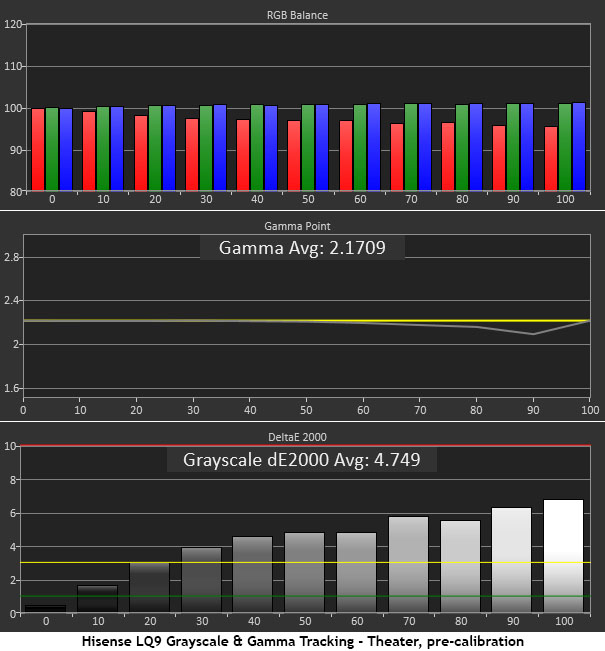
Grayscale tracking is a tad cool here with visible errors starting at 30% brightness and increasing to the full white threshold. Gamma is right on the 2.2 reference except for the 90% step, which suggests that contrast is set too high.
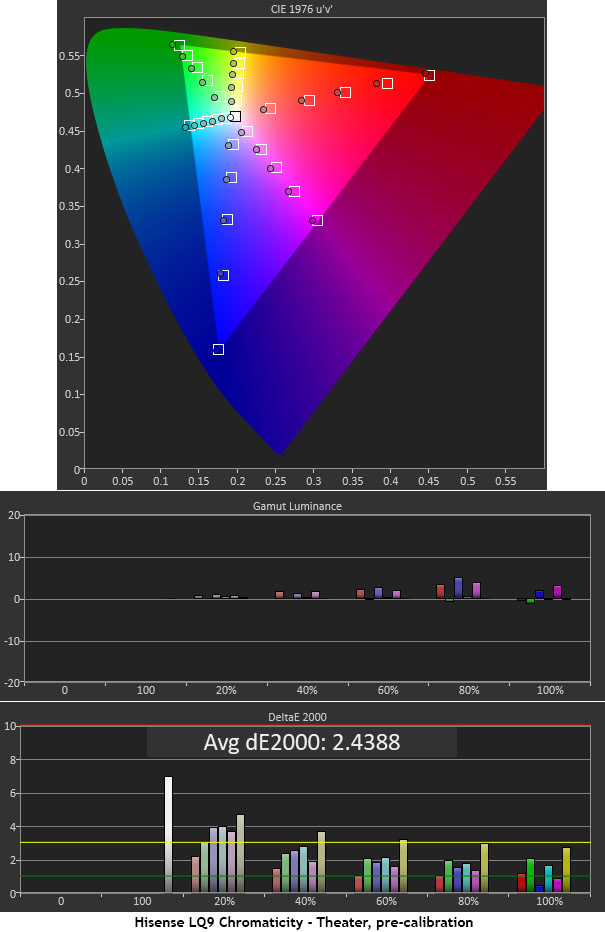
In the color test, the L9Q correctly selects the BT.709 gamut for SDR. You can change this to DCI-P3 or BT.2020 if you want, but technically, that will oversaturate SDR content. Here, red covers the full range but is a little undersaturated at the inner points from 20 to 80%. There are also slight hue errors in magenta and yellow. Color luminance is spot-on with less than 3% deviation from neutral balance. This is solid out-of-the-box performance, but if I owned an L9Q, I’d have it calibrated.
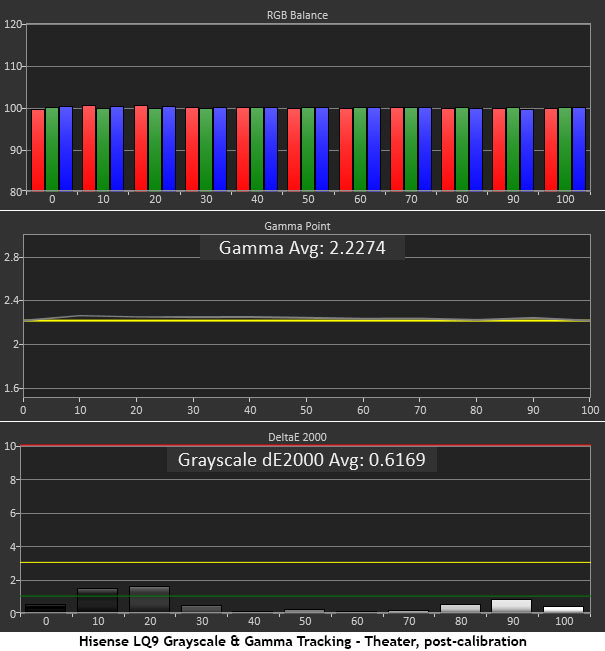
The L9Q includes two- and 20-point white balance adjustments, but I only need the two-point to get the job done. All errors are well below the visible threshold, with most under 1dE. I also lowered the contrast by two clicks to correct the luminance errors at 90 and 100% brightness. This is as close to
perfect as it gets.
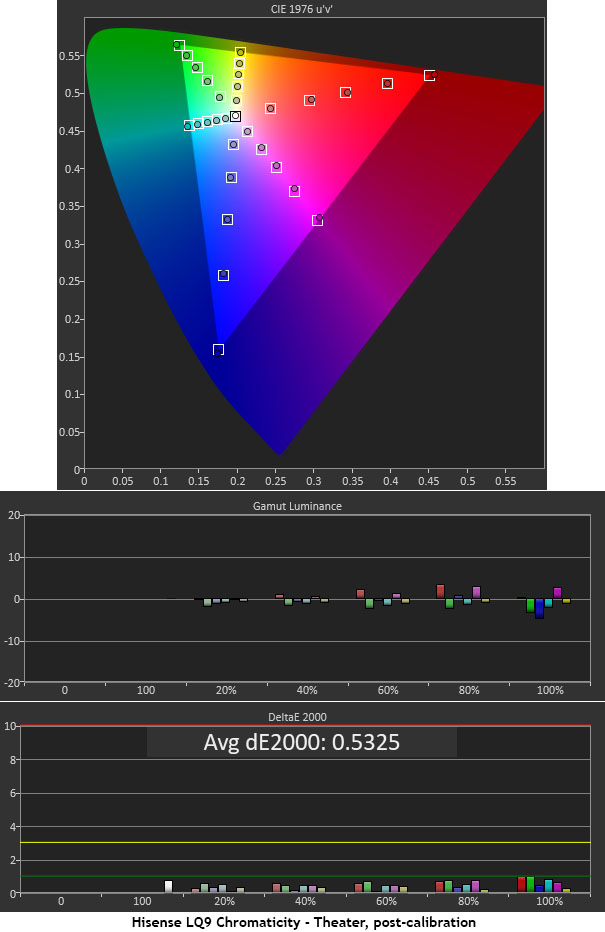
The adjustments had a positive effect on the color gamut test, which is now also close to perfect. In fact, I’ve only measured a few displays that can get their average error under 1dE. Luminance levels remain at neutral balance. This is reference-level performance. Like Wowzah!
HDR Tests
The L9Q supports all HDR variants, Dolby Vision, HDR10+, HDR10, and HLG. I tested its HDR10 capability here. I stuck with HDR Theater as the go-to HDR mode.
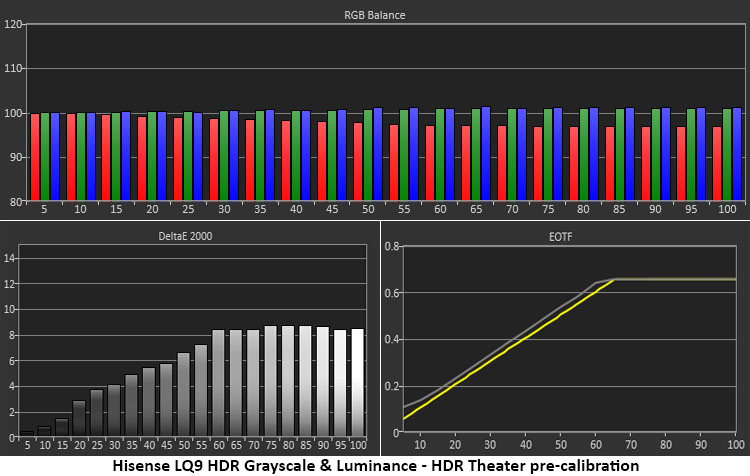
You can see the same cool tone in the HDR test as I found in SDR. The errors run up to almost 9dE in the brighter parts of the image. This makes it look dimensionally flat, and the color has less vibrance. The EOTF tracks true, though, which is a very good thing. I had Dynamic Tone Mapping turned on, but no other contrast options were in play.
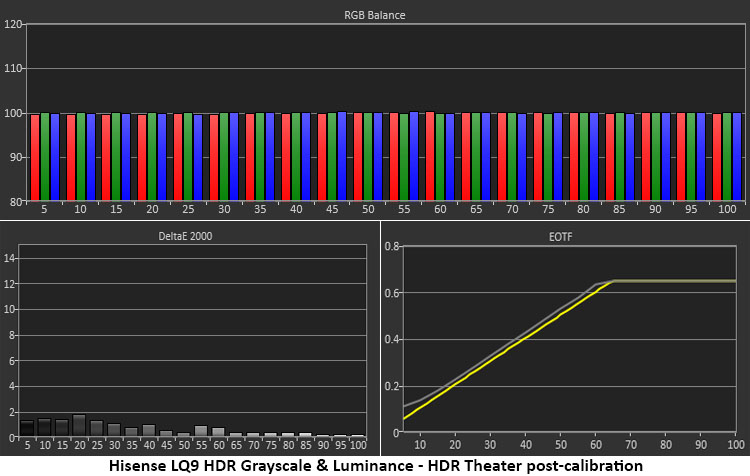
The two-point white balance was enough to get the L9Q in line. With all grayscale errors now under 2dE, neutral tones are free from colored tints. The EOTF is unchanged.
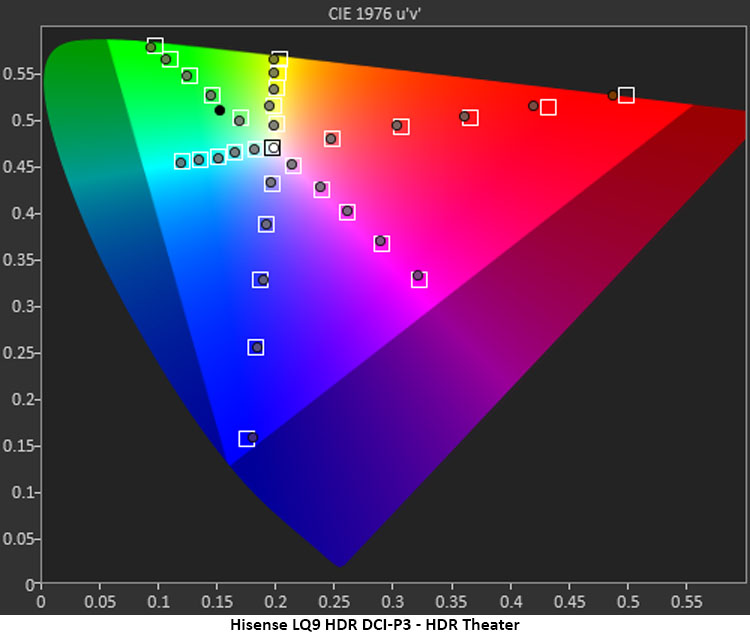
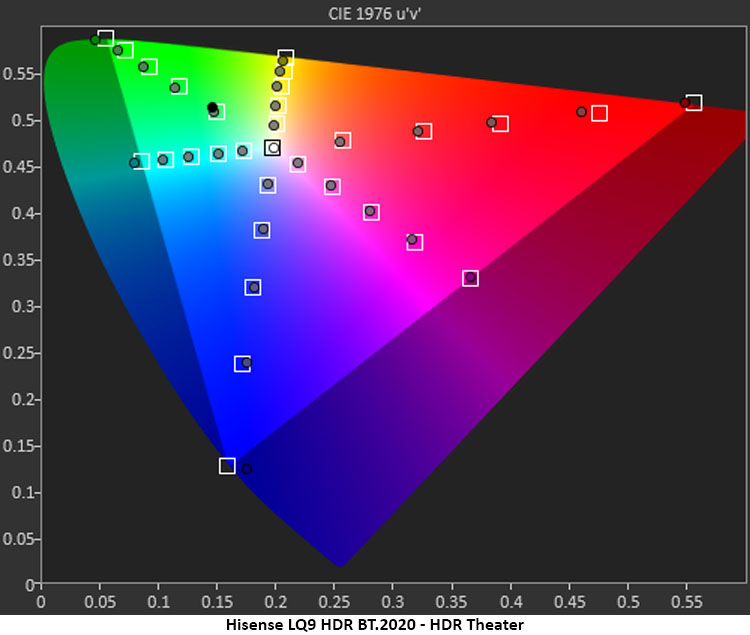
The HDR gamut charts above show a reference quality display. I have measured many HDR products, TVs, monitors, and projectors alike. Only a tiny handful of them get this close to perfection. DCI-P3 is fully covered with just a slight undersaturation at 90% red. BT.2020 is also fully rendered with just slight undersaturation at 90% and 100% red. The L9Q qualifies as a professional post-production projector. And it requires very little tweaking to achieve this feat. Bravo!
Brightness & Contrast
The L9Q serves well as a television replacement by being extremely bright. Depending on settings, you can expect as much as 530 nits, which is enough to compete with ambient room lighting, especially if you use an ALR screen. I used a Stewart Studiotek 130, which isn’t ideal when the lights are on, but I still saw a very watchable image. To get the hard numbers, though, the lights were turned off.
In SDR mode with calibration settings in place, no dynamic contrast options engaged, and the laser on 10, I measured:
● White – 363.0384 nits
● Black – 0.1323 nit
● Contrast – 2,744.7:1
This is quite respectable for a DLP, which typically hits around 1,200:1. The Active Contrast option didn’t make a difference in my static tests, which is not unusual. But the Brightness Enhancer had an impact for sure. With it turned to High, I measured:
● White – 553.7748 nits
● Black – 0.1555 nit
● Contrast – 3,560.9:1
The thing to remember is that color temp becomes very green with higher settings of this control, so you must calibrate again to compensate.
HDR is pretty much the same story. Here is the default setup, post calibration, with the laser on 10 and dynamic tone mapping engaged for HDR10:
● White – 343.1143 nits
● Black – 0.1633 nit
● Contrast – 2,100.7
You’ll want Active Contrast on High for HDR content, which doesn’t help in these tests but makes a visibly positive difference to actual content. With Brightness Enhancer set to High, I measured:
● White – 531.4324 nits
● Black – 0.0901 nit
● Contrast – 5,896.5:1
Again, you’ll have to recalibrate when using any setting of Brightness Enhancer, as each click alters the color temperature.
Settings
● SDR Mode Theater
● Black Level 0
● Contrast 48
● Gamma 2.2
● Color 50
● Hue 0
● Color Temp Warm1
● Offset 0 -2 -2
● Gain 3 -4 -5
● Active Contrast High
● HDR Mode Theater
● Color Temp Warm1
● Offset 0 0 0
● Gain 1 -13 -12
● Active Contrast High
● Dynamic Tone Mapping On
Secrets Sponsor
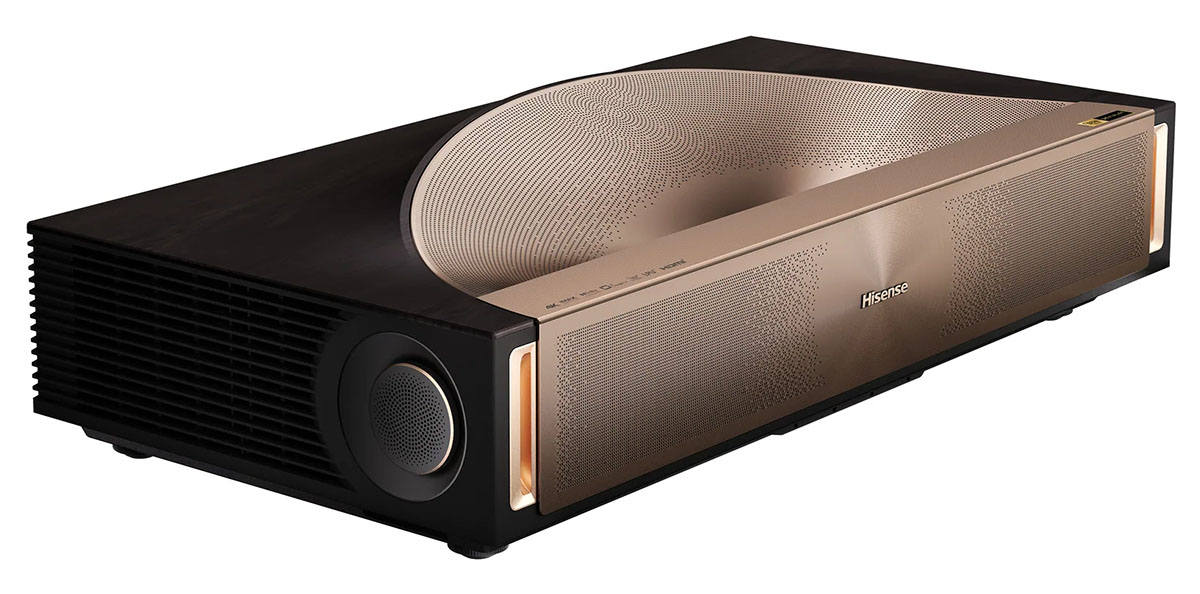
Hisense’s L9Q UST Projector is a terrific television replacement that costs no more than a jumbo panel and delivers a picture up to 200”.
- Sharp and bright image with tremendous color volume
- Calibrates to reference standard
- Intuitive Google TV interface
- HDMI CEC that actually works
- Best in class audio quality
- A subwoofer output
The Hisense L9Q is one of the more expensive ultra-short-throw projectors I’ve reviewed, but in the grand scheme, it isn’t nearly as pricey as many premium displays. And it is definitely a premium display in its own right. The picture quality is excellent, and with calibration, it achieves reference quality.
What’s most impressive, though, is the audio. 10 internal speakers and over 100 watts of amplification produce sound better than I’ve heard from any speaker-equipped projector. Hisense touts its collaboration with Devialet and The Paris Opera, and it is an earned moniker. I haven’t heard any sound bars in its league, and it can easily go toe-to-toe with an AVR and surround speakers. If Hisense added a subwoofer output, it would be even better.
Of course, it’s a great projector too. It has tremendous color volume with sharp optics and solid contrast. The dynamic options and tone mapping work well, and it covers every HDR format, including Dolby Vision, something most projectors lack. I also enjoyed the Google TV interface and the no-fuss HDMI CEC operation with my Blu-ray player. If you’re looking for a 200-inch television replacement that brings high-end performance and style, and sounds great too, the Hisense L9Q Tri-laser UST projector is well worth the price. Definitely check it out.