 YouTube
 Facebook
 X
X LinkedIn
 Pinterest
 Instagram

 Chris Eberle
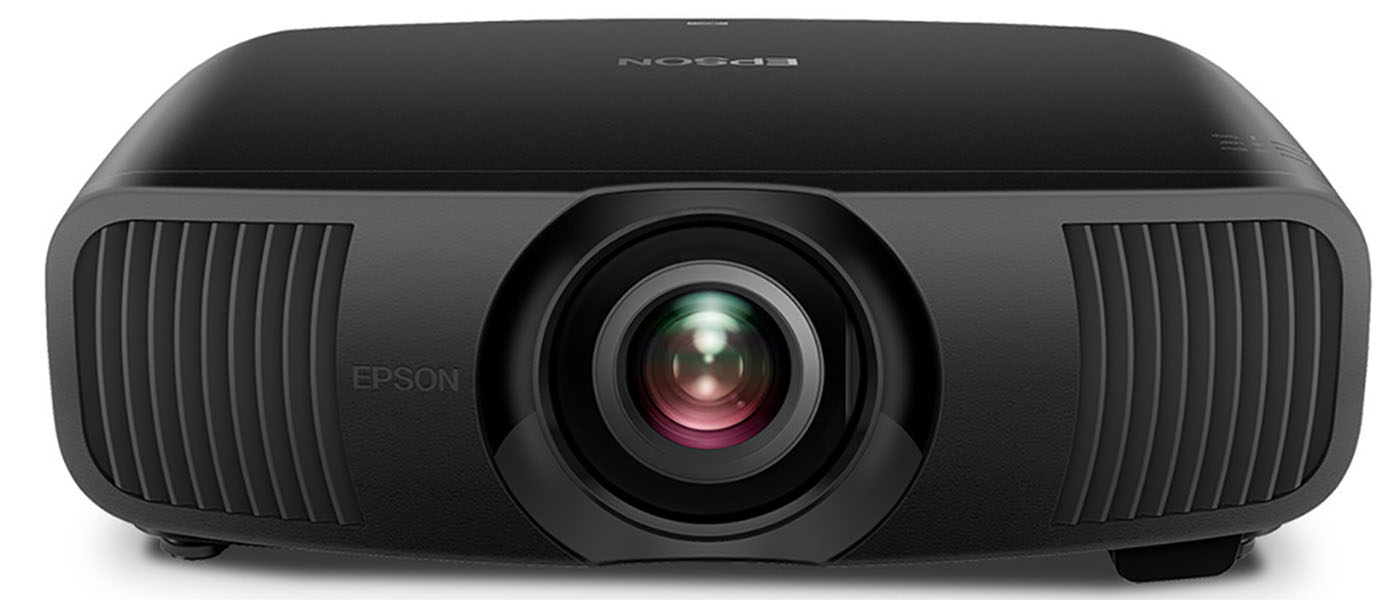
The Epson Pro Cinema LS9000 4K HDR 3LCD Laser Projector is a 4K Ultra HD display with 2,200 lumens of white and color brightness. It supports HDR10, HDR10+, and HLG signals and sports reference level color accuracy. Fully motorized glass optics offer generous shift and zoom with memories for easy installation and use with anamorphic lenses. With a 3LCD laser imaging engine, it’s good for 20,000 hours of maintenance-free entertainment and no bulb changes or recalibration. Low input lag, a 4K 120 Hz mode, and HDMI 2.1 with e/ARC make it ideal for gaming. Installer-friendly features include IP control for automation systems like Control4 and Crestron.
Epson Pro Cinema LS9000 4K HDR 3LCD Laser Projector
- 4K HDR 3LCD Laser Projector
- Fully motorized lens with settings memories
- HDR10, HDR10+ and HLG support
- 2,200 lumens white and color brightness
- 20,000-hour service life from laser diode engine
- Two HDMI 2.1 inputs, one with e/ARC
- 120 Hz with low lag for gaming
If any display manufacturer can be said to have mastered the price/performance ratio, it’s Epson. They are the number-one-selling projector brand for a reason. They consistently offer high-performance products that don’t cost a lot. It’s a simple formula, and it works.
For years, their bread-and-butter lines have been called Home Cinema and Pro Cinema. You could always find an excellent projector with a long and useful feature list for between $3,000 and $5,000. Today, I’ll be checking out one that sits right in the middle at $3,999, the Pro Cinema LS9000 4K HDR
3LCD Laser Projector. I’ll call it the LS9000 from here on out.
It ditches the traditional, hot and temporary UHP lamp for a laser diode array good for 20,000 hours of maintenance-free viewing. It retains consistent color and brightness for its entire lifespan and is rated at 2,200 lumens, a figure I was able to verify in testing. It is more than bright enough to install in a medium-to-large theater or a media room with some ambient light.
The image engine is Epson’s 3-chip 3LCD technology, which uses separate chips for red, green, and blue that deliver an honest native contrast ratio of around 6,000:1. A 32-bit Epson ZX picture processor ensures proper handling of all video formats, plus things like frame interpolation and noise reduction. User memories store not only image settings but lens position too. You can use an anamorphic lens with ease and control it through IP automation systems like Control4 and Crestron.
There’s a lot to see here, so without further ado, let’s take a look.
Type:
3-chip 3LCD 0.74” Poly-Silicon TFT Active Matrix 12-bit
True Laser Diode Array
Resolution:
3840×2160 4K PRO-UHD
HDR:
HDR10, HDR10+, HLG
Service life:
20,000 hours
Light output (mfr):
2,200 Lumens of White Brightness (ISO Rated), 2,200 Lumens of Color Brightness (IDMS Rated)
Throw ratio:
1.35-2.84, zoom 1:2.1
Lens shift:
±96.3% vertical, ±24% horizontal
Screen size:
50” to 300”
Video connections:
2x HDMI 2.1, 1 w/eARC
Additional connections:
3x USB, 1x RJ-45, 1x RS-232, 1x 12v trigger
Dimensions (W x H x D):
20.5″ x 17.6” x 7.6”
Weight:
28 lbs.
Warranty:
3 years
Price:
$3,999
Company:
SECRETS Tags:
Epson, pro cinema ls9000 4k hdr 3lcd laser projector, 4k projector, hdr projector, laser projector, home theater projector
- Epson Lifestudio Flex Plus Projector Review
- Epson QL7000 4K HDR High-Lumen 3LCD Laser Projector Review
- Epson QB1000 4K 3LCD Laser Projector Review
Secrets Sponsor
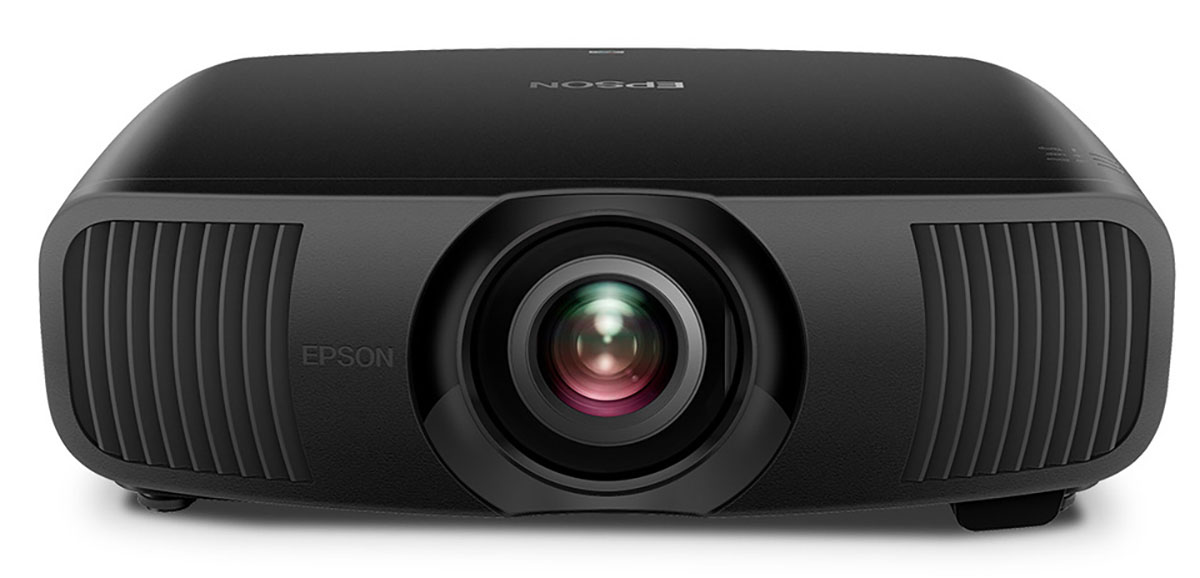
The LS9000 is an evolution of the Home Cinema and Pro Cinema displays I’ve been reviewing for the past 10 years. At its core is a 3LCD engine, three imaging chips of 0.74 inches, one for each primary color. Lighting it up is a laser diode array good for 2,200 lumens of white and color brightness and a 20,000-hour lifespan. The laser can be dimmed for better suitability in small light-controlled rooms or opened up to the max in media rooms with some ambient light.
The LS9000 supports HDR10 and HDR10+ formats, plus HLG (Hybrid Log Gamma), which is used by European broadcasters like the BBC, and in many YouTube videos. HDR10+ is an extension of HDR10 that adds dynamic metadata to better pair with displays of differing brightness capabilities. It’s a lot like Dolby Vision, which the LS9000 does not support. The only thing I missed here was a dynamic tone mapping option for HDR10 content. But there are dynamic contrast and scene adaptive gamma settings that can be used to enhance HDR material to the user’s preference.
The lens is all-glass and fully motorized with a wide zoom range of 1:2.1 and generous shift, 96.3% vertical and 24% horizontal. Focus is motorized too, which makes it easy to get a perfect image on the screen in a few minutes. You can also use anamorphic lenses for extra-wide screen formats and store up to three lens configurations in a user memory. They can be used for picture settings and calibrations, too.
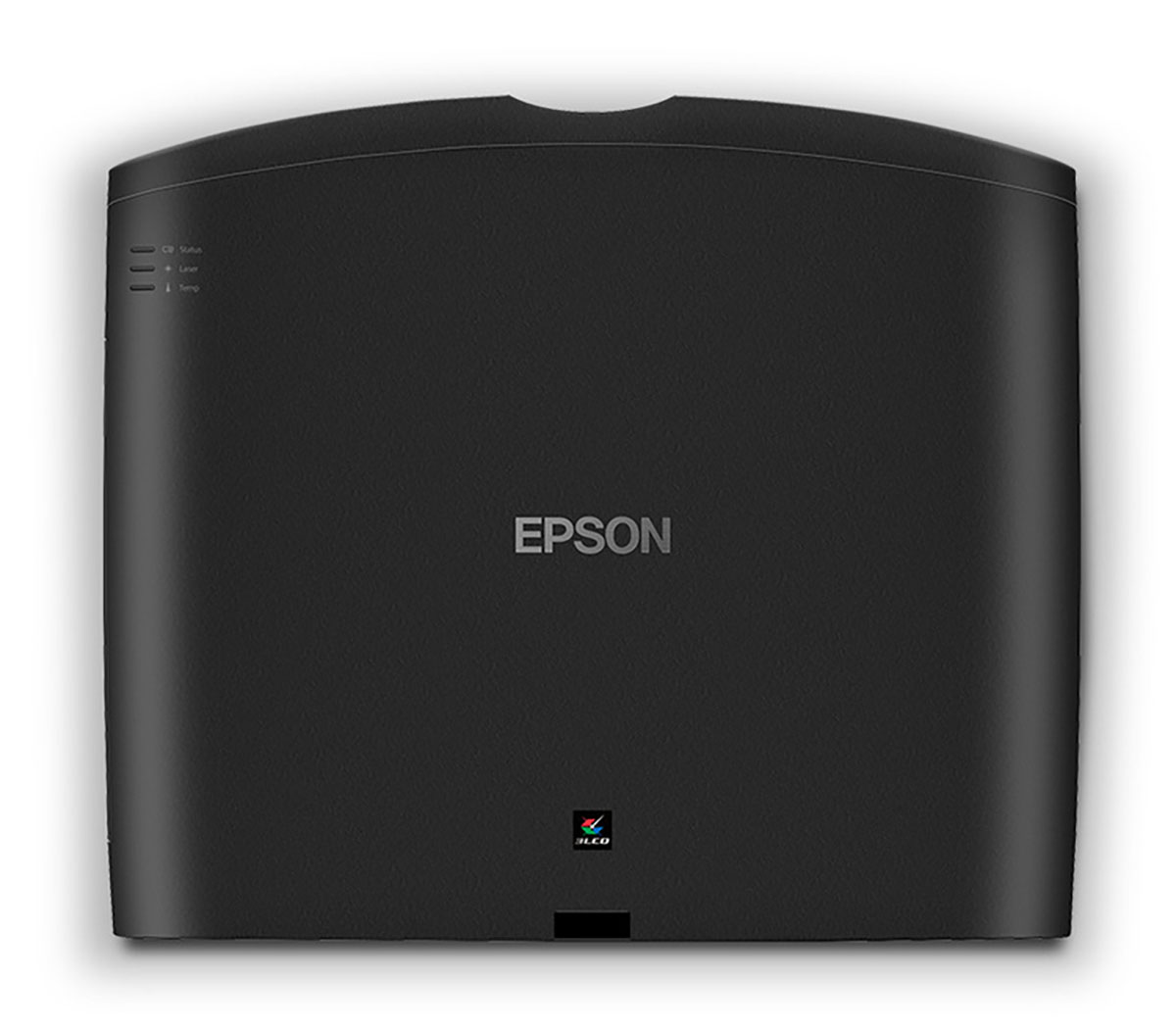
Physically, the LS9000 fits between the Home & Pro Cinema models of a few years ago and Epson’s latest high-end models. The chassis is about the size of a large AV receiver and weighs 28 pounds. It’s finished in a textured matte surface that reminds me of leather. On the practical side, it absorbs all stray light, which is a very good thing.
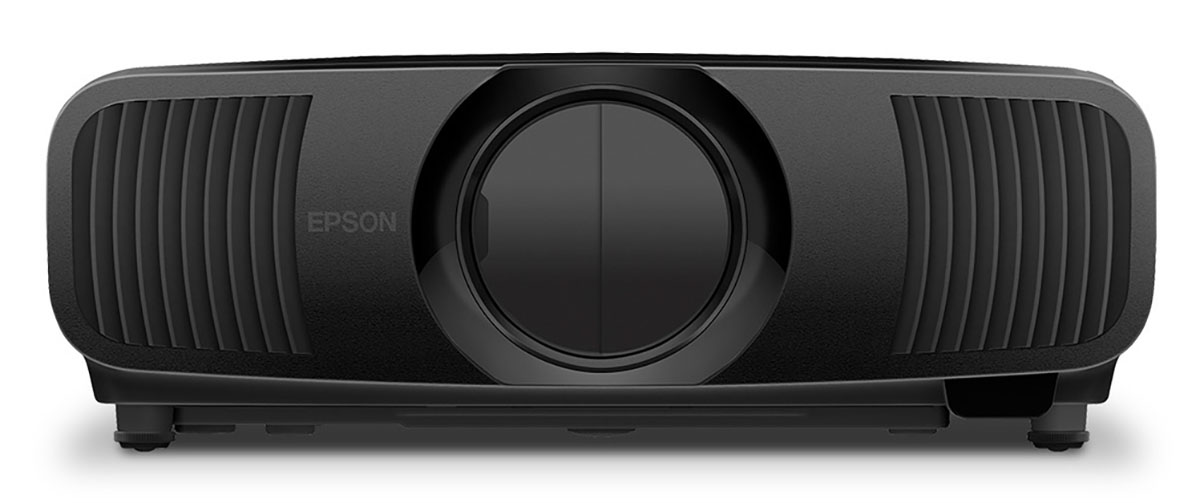
The lens sits in the center behind a motorized dust cover and is flanked by two large vents plus more grills on each side. Airflow is a generous 71.4 cfm, which is enough to keep fan noise to a low range of 22-30dB.
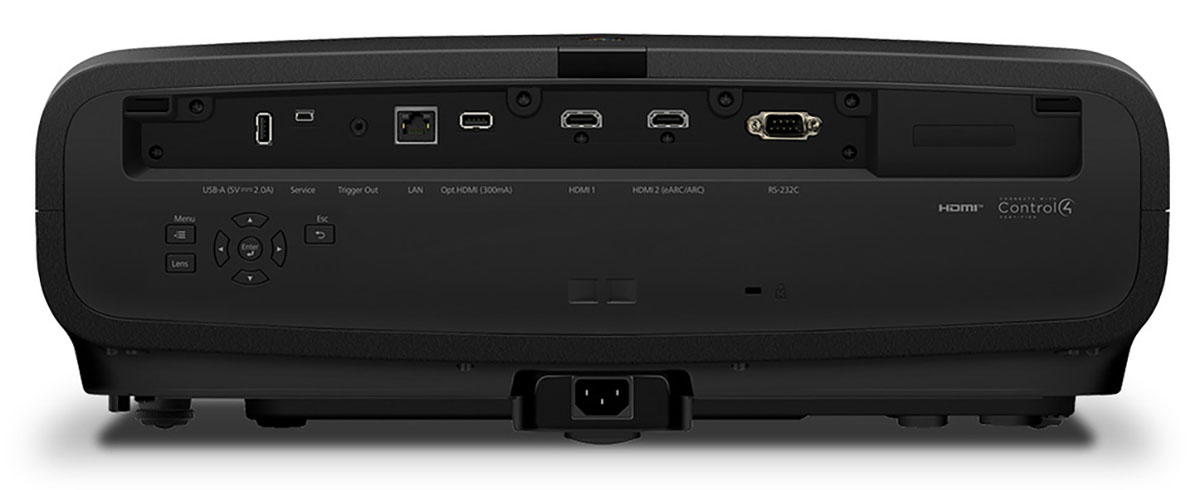
In the back is a well-stocked recessed input pack. You get two HDMI 2.1s, one has e/ARC, for video, along with USB ports for data, service, and power. Control happens via the RJ-45 jack over IP, which supports Crestron and Control4 systems. A 12V trigger connects to lighting and motorized screens, and if you have an old-school automation setup, there’s RS-232.
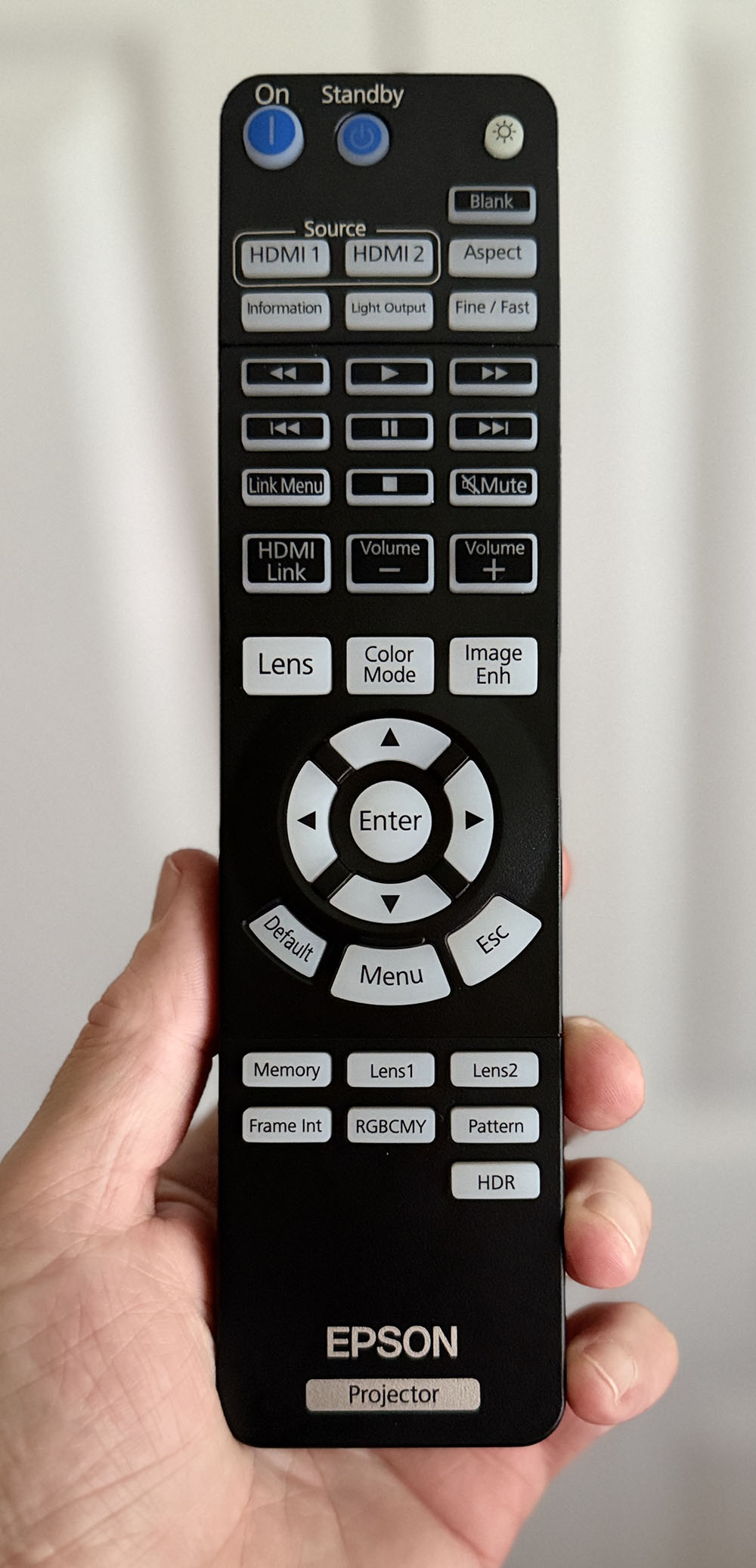
The backlit remote is Epson’s large unit with many keys for one-touch access to things like picture modes, lens controls, and the like. In the middle is menu navigation and transport for HDMI CEC-enabled devices. You can quickly switch between two of the lens memories and go right to adjustments like HDR, color management, and frame interpolation. The lens focus, zoom, and shift are also just a single-press affair.
The LS9000 was easy to set up on a stand behind my theater seats. This put it around 10 feet from my screen, a Stewart Filmscreen Luminesse with Studiotek 130 material. The motorized lens made short work of geometry and focus since I could stand right by the screen to judge sharpness. One feature I wish Epson would add to all its projectors is the ability to shut off the pixel shift and view the native 1920 x 1080 dot matrix. This makes installation much easier and more precise because you can simply focus on the pixel gaps rather than fine lines or shapes. I’ve only seen this included in the much more expensive QL7000.
The menu system is like all the latest Epson Pro Cinema models, where you get sub-menus on the left side and the complete menu in the main window. You can scroll through every single option if you like, and once you start making changes, the most used fields will populate an area at the top for quick access. It’s a unique approach to menu design that I haven’t seen elsewhere.
With geometry dialed in, I turned to calibration. The Natural mode was closest to the mark and could be used without adjustment if you like. After turning off all dynamic options, I tweaked grayscale and gamma for reference level color accuracy. I noted that the color gamut covered BT.709 perfectly for SDR content, with a volume of around 88% of DCI-P3 for HDR.
The LS9000 includes a huge array of image controls, including two and 11-point white balance, gamma presets and editor, and full color management. There are five picture modes that share settings between SDR and HDR. You can also save settings to user memories and create your own configurations.
Once calibrated, I experimented with the various dynamic options. Dynamic Contrast is a global dimming feature that increases range by lowering the black level. When a zero-level signal is displayed, the laser is shut off, making black level measurements impossible. Peak brightness is around 176 nits in Natural mode with the laser on 90%. Max output is over 279 nits in the Dynamic picture mode. This was from a 1.3 gain 92” screen with the projector 10 feet away.
For finer tweaking, there’s a Scene Adaptive Gamma slider with 20 levels, which works for SDR and HDR. To adjust the luminance tracking for HDR only, go to the Signal I/O menu and open the Dynamic Range section. There’s a slider there called HDR Setting that moves the entire EOTF up and down. I found the best picture when it was set to 10. Dynamic Contrast was set to High Speed for all content.
With calibration and tweaking complete, I was ready to watch some movies and TV shows.
I am often asked to compare DLP and LCD/LCoS projectors because many models deliver the same specs for about the same money. In general, DLPs have lower contrast but are slightly sharper than a similarly priced LCD. But one thing LCDs have in their favor is a film-like presentation. This is hard to quantify because I can’t run a test that ranks a projector’s film-likeness. It’s a matter of look and feel. So, to circle back to the LS9000, it is an extremely film-like projector.
It was apparent from the get-go that its optics were superb. It’s razor sharp, but because it’s an LCD, and because of Epson’s particular approach to pixel shift, it is more film-like than my reference DLP, a BenQ W5800. The LS9000 truly creates a cinematic experience. Like all good projectors, once it’s dialed in, you’ll never go to a commercial theater again.

I started my evaluation with Ultra HD and Blu-ray discs. First up was Transformers: The Last Knight. Say what you will about Michael Bay’s storytelling, but there is no doubt that he is a master at perfectly integrating highly detailed CGI with human characters and real scenery. An early scene where Optimus lands on Cybertron shows an array of fine textures. Metal surfaces show a clear difference between clean and dirty, shiny and scratched, and everything in between. The Transformers films are feasts for the eyes, and few projectors show them more enjoyably than the LS9000.
Next into the player was Ant-Man and The Wasp. Here, I was looking for fine bits of color in an otherwise monotonal backdrop. The lab sets are very neutral in tone, with the reds and yellows of our hero’s suits standing out in contrast. The LS9000 did a nice job separating the foreground from the background, which lent a palpable 3D effect to the presentation. CGI was expertly integrated here as well, to where you couldn’t tell what was real and what was digital.
To test the LS9000’s video processing and noise reduction ability, I loaded up Grand Prix, the one from 1966. It is one of the most colorful vintage movie encodes out there, but it also includes heavy film grain. The Epson managed this nicely by keeping the grain visible but preventing any crawly artifacts from spoiling the fun. Watching the opening scenes at Monaco reminded me that I had locked the color space option on BT.2020 because the characters’ faces were extremely red. Switching it back to Auto fixed that problem. Though the LS9000 doesn’t have a huge color gamut, it does have enough extra volume to make a clear difference between SDR and HDR.

To check out streamed content, I fired up my Apple TV 4K to watch selections on Netflix and Discovery. First up was Is It Cake? Holiday, Season 2. This is a fun show shot in Dolby Vision, and here, it showed just fine in HDR10. It lost a bit of depth compared to what I see on a DV-capable display, and I wished for a dynamic tone mapping option. Epson offers that in the $7,999 Pro Cinema QB1000, which I reviewed recently. There was plenty of color and depth, though, and it looked great here. I also watched a few episodes of Formula 1: Drive to Survive and made the same observation. The color and contrast were there, but in HDR10 with its fixed metadata, it lacked that last nth degree of pop.

Standard definition shows like House of Muscle and Alex vs America on Discovery+ were very well suited to the LS9000’s look and feel. The filmic presentation took the cold edge off the content and gave it a warmth and depth that you won’t see on a flat panel TV. Perhaps I’m waxing a bit, but I thought it was more inviting to watch. If you’re considering the LS9000 as a television replacement, it works great if there isn’t too much ambient light, or, like any projector, it’s best if there’s none at all.
To test the LS9000, I set up my usual suite of benchmarks using the latest version of Calman from Portrait Displays. To measure color, I used an X-Rite i1 Pro Spectrophotometer, and for luminance, an X-Rite i1 Display Pro tri-stimulus colorimeter. Signals were generated by an Accupel DVG-5000. HDR signals were generated by the same unit with an HD Fury Integral in the signal path.
SDR Tests
After measuring both Cinema and Natural modes, I settled on my Epson go-to, Natural, as the basis for all tests and viewing evaluations. It’s pretty close to the mark before calibration and with a few tweaks, hits reference level accuracy.
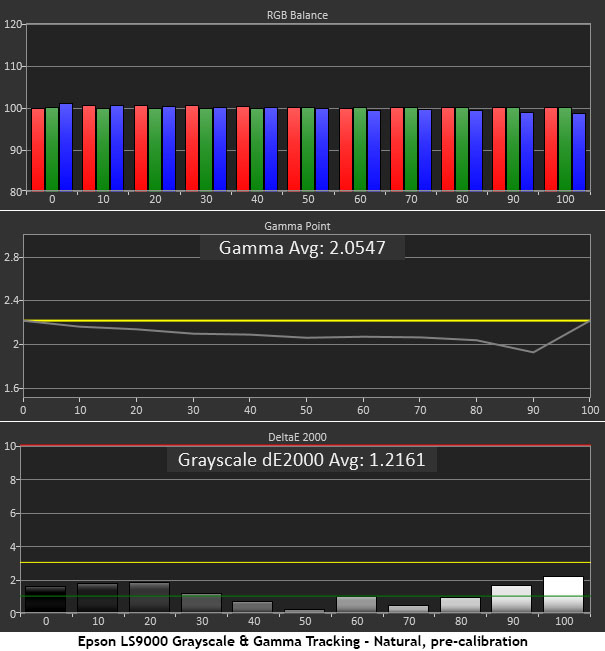
Grayscale tracking is spot-on out of the box with all errors below 2dE except for 100% brightness, which just cracks the line. This is well below the visible threshold of 3dE. Gamma is a bit light, though. While there is no clipping of highlight or shadow detail, the image looks a little flat, as if there’s a light haze over it.
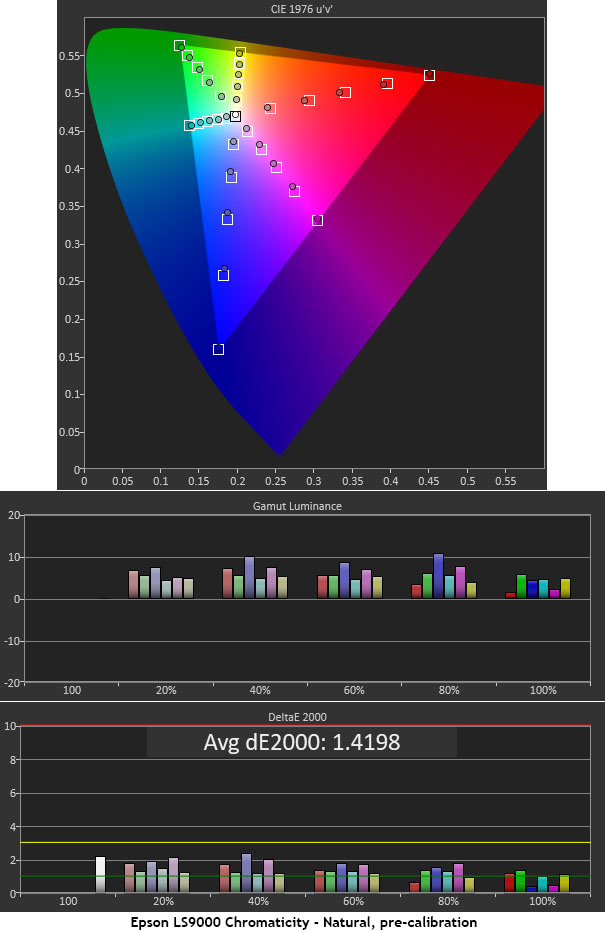
The color test is also nearly perfect, with all saturation and hue points near their targets. You can see slight undersaturation in red, magenta, and blue, but these errors are almost impossible to spot in actual content. Luminance levels are well balanced and all within 10% of neutral. This is excellent out-of-the-box performance.
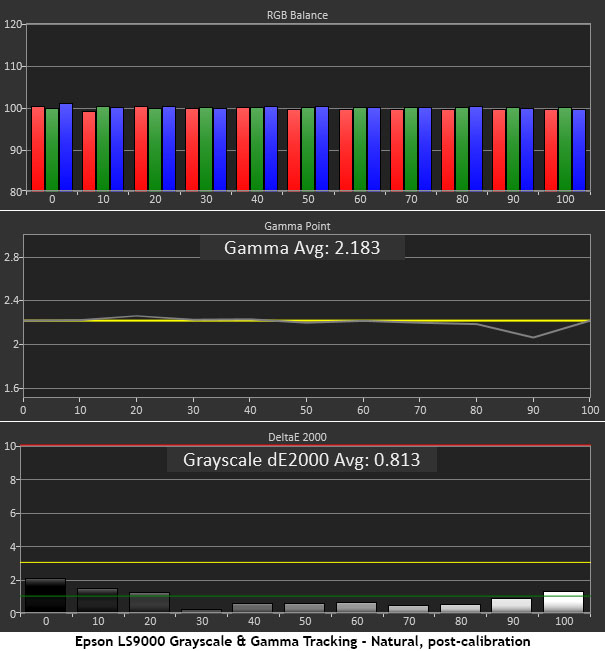
Though grayscale was already free of visible errors, I tweaked the two-point controls anyway for a small improvement. The main subject of my efforts was gamma, and fortunately, I did not need the multi-point editor to achieve near-perfect tracking. By lowering the gamma slider by one click to -1, and reducing contrast from 50 to 47, I got all points on the reference line except for one. I could not get rid of the dip at 90%, even with the editor. No matter because the haze was gone. The image came to life with more vibrant color and deeper contrast.
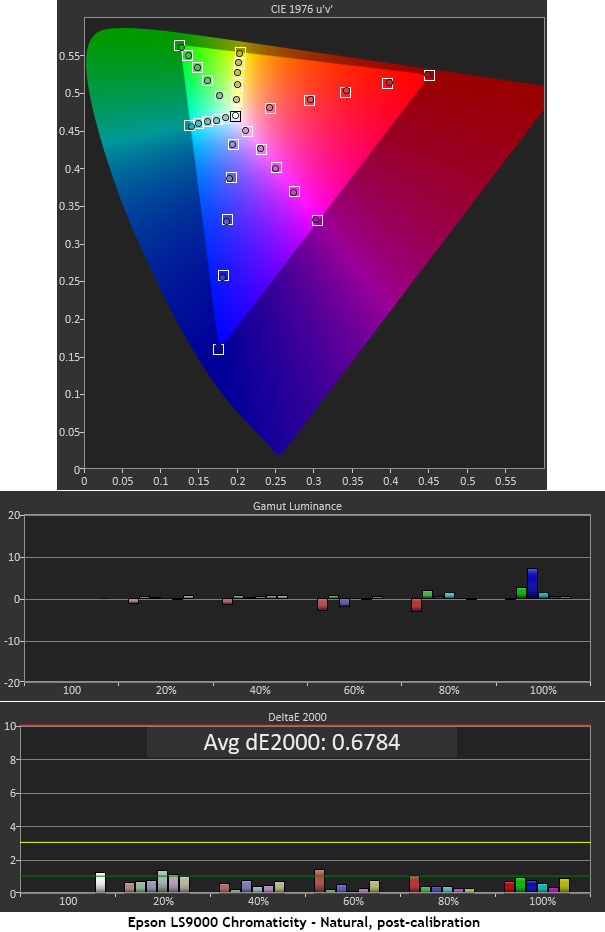
You can see how color is affected by gamma and grayscale adjustments in the final gamut chart. Red, magenta, and blue are now slightly but visible more saturated. And luminance levels are all neutral except for a slight rise in blue at 100%. This is an invisible error. A final color dE of 0.68 is about as good as it gets.
HDR Tests
After applying an HDR10 signal, I found that my SDR settings carried over within the same picture mode. Therefore, I would need to select a different mode if I wanted an independent calibration.
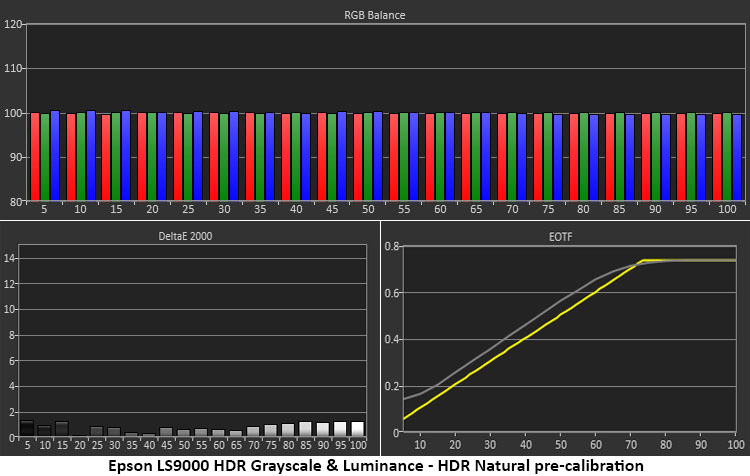
There are no visible grayscale errors with all values under 2dE. But the EOTF is a bit light in tone. Luckily, it tracks linearly along the reference line, so in theory, the only necessary adjustment should be one that moves the entire luminance curve as a unit.
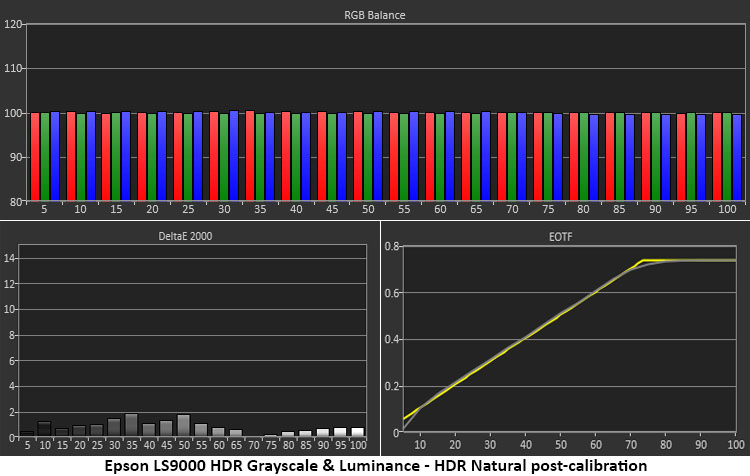
That adjustment is found in the Signal I/O menu under Dynamic Range. I changed the HDR Setting from 8 to 10 and got a perfect result. I also turned on the Dynamic Contrast option and set it to High Speed. I was able to keep that setting for SDR, so in my case, there was no need to create an independent HDR picture memory. The Dynamic Range option only affects HDR content. This is excellent performance.
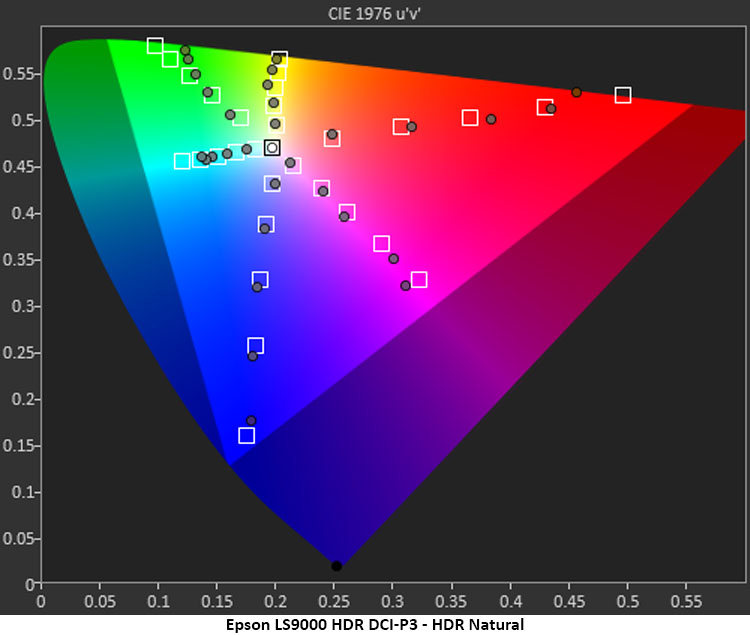
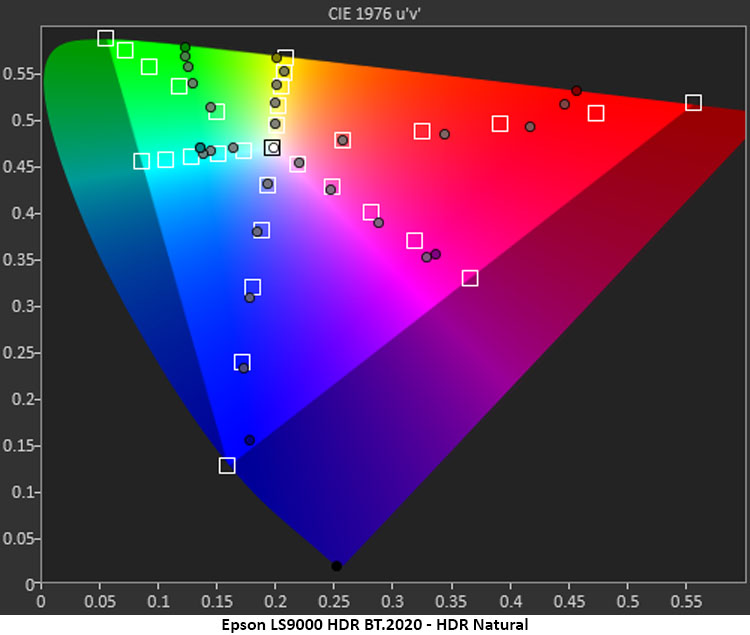
The gamut was measured after making these tweaks. The LS9000 sticks to the standard with slight oversaturation until it runs out of color (for DCI-P3) at 90% red, 80% green, and 98% blue. In the BT.2020 chart, it tops out at 78% red, 60% green, and 95% blue. Most HDR content looks good because its color information is predominantly in the low and mid-tone regions. Only the most saturated hues fall short when compared to a display that covers more of DCI-P3.
Brightness & Contrast
My LS9000 sample measured just over 2,200 lumens in its Dynamic picture mode from a Stewart Filmscreen Studiotek 130 Luminesse screen. The peak in nits from 10 feet away was 279.1962, which is roughly equal to 78 foot-Lamberts if you like the old-school benchmarks. The black level was too low to measure because the laser was shut off.
Once calibrated, I dialed the laser level back a little to a more comfortable 50fL and went back to Natural mode to measure the projector’s native contrast.
SDR, Laser Level 90%, Natural mode, calibrated
● White – 177.7267 nits
● Black – 0.0298 nit
● Contrast – 5,960:1
HDR, Laser Level 90%, Natural mode, calibrated
● White – 176.1656 nits
● Black – 0.0295 nit
● Contrast – 5,962.6:1
With dynamic contrast options turned off, the LS9000’s dynamic range is the same for both formats. Adjusting the Dynamic Range option for HDR doesn’t change contrast, but it does improve picture depth because it more closely matches the EOTF reference used to master HDR10 content. Using Dynamic Contrast for SDR and HDR makes the black level too low to measure.
SDR Settings
● Mode Natural
● Brightness 52
● Contrast 47
● White Balance
● Offset 50 51 50
● Gain 48 48 51
● Gamma -1
For HDR, use the same settings shown above and change the Dynamic Range/HDR Setting in the Signal I/O menu from 8 to 10. Use the Dynamic Contrast option to your preference. In my experience, it had a positive impact on picture depth, color saturation, and clarity.
Secrets Sponsor
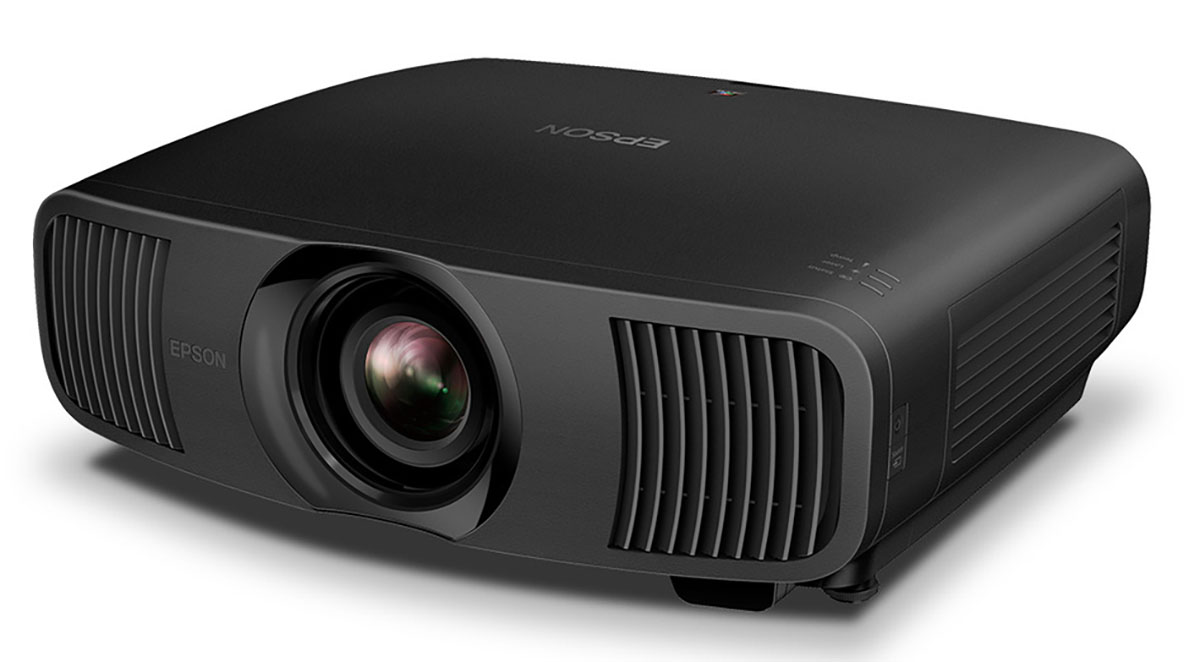
Epson’s LS9000 4K HDR 3LCD Laser Projector takes the price/performance ratio to new heights with a bright, colorful image and a smooth film-like presentation.
- Sharp, bright, and colorful image
- Smooth film-like presentation
- Accurate out of the box
- Tons of calibration options
- Easy and flexible setup with motorized lens
- Premium build quality, appearance, and finish
- A larger color gamut
- Dynamic tone mapping for HDR
There is little cause for complaint here. The Epson LS9000 4K HDR 3LCD Laser Projector delivers tremendous performance and an inviting image for a reasonable price. It’s accurate out of the box, and it’s bright enough to work in many different environments and scenarios. You can use it to replace a TV or make the anchor of a rockin’ home theater. It has a film-like quality that’s hard to reproduce with a flat panel or a DLP projector. And it’s razor sharp thanks to quality optics.
My only wishes were for a larger color gamut and the addition of dynamic tone mapping. The latter can be found in Epson’s $7,999 QB1000, also in the Pro Cinema line. And though DCI-P3 coverage is a little short of 100%, it fills in the midtones perfectly, and for the vast majority of content, that’s enough to make an impact. HDR definitely looks better than SDR.
Epson has long been a staple for home theaters that balance the budget between video and audio, when the user can’t afford $50,000 for a one-percenter’s display. The LS9000 4K HDR 3LCD Laser Projector is a great choice when you’re going for a film-like presentation, and 2,200 lumens is enough. If you have a light-controlled space, it’s more than enough. I thoroughly enjoyed my time with it and give it my Highest Recommendation. If you can budget $3,999 for a projector, definitely check it out.